How to Create Shoe Video Ads: Turn Product and On-Foot Photos into English Ads
What order should you use for side views, sole shots, and on-foot photos? This guide walks through assigning your existing photos to scenes, reviewing the English script, and checking product accuracy to finish your video ad.
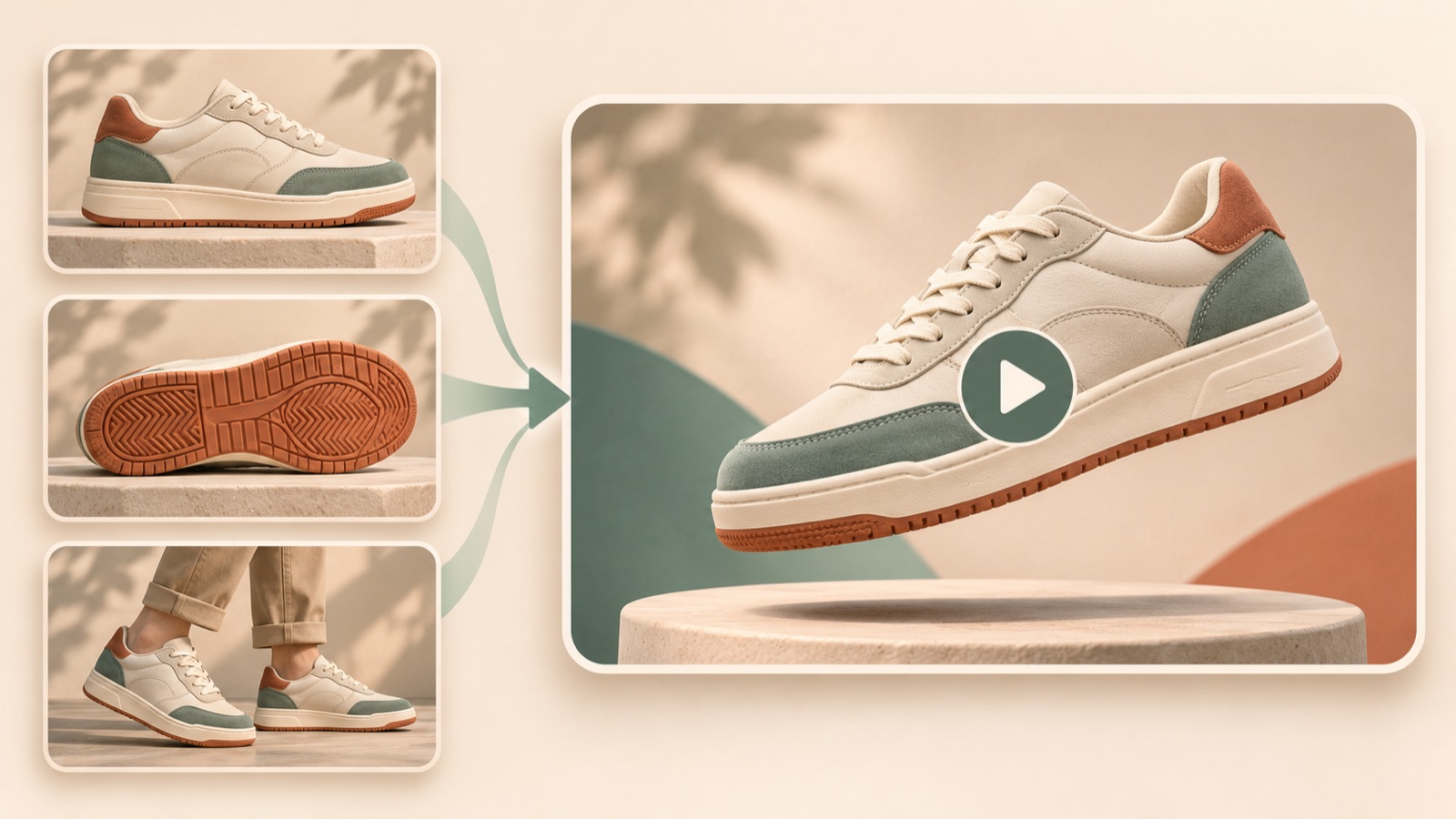
Creating a shoe video ad starts with arranging your existing photos in the order that answers shoppers’ questions. Show the design, explain why someone might choose it, and then prompt them to explore the product. Assigning side views, on-foot photos, and detail shots to individual scenes also helps you write a more specific English video script. Follow the steps below to choose a reference in AdForge, create an English video, check it against the actual product, and download it.
Give each photo one question to answer
First, choose a single model and color to advertise, then gather your photos. Use the side view to show the overall silhouette, on-foot photos to show the proportions of the trousers and shoes together, toe shots to show the shape, heel shots to show the finish, and sole shots to show the tread pattern. Photoroom’s guide to preparing shoe photos also recommends collecting views of different parts, including the sides, soles, heels, toes, and fastenings.1 Prioritize photos that give each scene different information over multiple photos taken from the same angle.
Next to each photo, separate visible features from claims that need additional evidence. A rounded toe or color combination can be explained through a photo, but all-day comfort or slip resistance cannot be assessed from photos alone. Leave any feature claims unsupported by the product description out of the script as well. Group the materials you upload to AdForge by the same model and color, and check that the laces, stitching, and soles match across the on-foot and detail photos.
Choose a reference your existing photos can support
If you have strong side views and on-foot photos, choose a design-focused format. If your material and stitching photos are clear, choose a detail-focused format. For references built around running or flexing the sole, first determine whether you have materials that demonstrate those movements. TikTok’s official guide describes an opening hook, purchase benefits, voiceover and captions, and a call to action as elements of a video.2 When reviewing references, note which photos could support each element to make your choice easier.
In AdForge, you can search active ads from the Meta and TikTok ad libraries and see how many days each ad has been running. Saved ads are analyzed for their hook, pacing, cuts, captions, voice, and music. Avoid judging performance solely by how long an ad has been running. Base your selection on whether your photos can support the opening scene and the reason to buy. Use the structure of the hook and progression as a reference instead of copying the original wording or brand expressions.
Build the script by pairing English copy with photos
For a hypothetical example, consider a sneaker with a cream upper and a dark sole. Open with a side-view photo and “Meet your next everyday pair.” Then suggest a styling direction with “Pair it with denim or relaxed trousers.” over an on-foot photo. Follow with a close-up of the color combination and “Cream upper. Dark sole.” Finish with a full product photo and “Explore the collection.” In this example, each line either describes something visible in the accompanying photo or reads as a suggestion.
When applying this to your own product, change the colors, styling suggestions, and purchase action. Only include material names confirmed in the product information, and adjust the closing line so it does not imply colors or collections you do not actually offer. Putting several features into one English sentence makes it harder to check the connection between the visuals and the words. Following the principle of matching voiceover and captions to each scene, start by briefly defining what each photo needs to explain.2
Upload your materials and generate an English video in AdForge
Find and save shoe ads in AdForge’s ad search, then review the analysis to choose a reference that fits your prepared photos. When remaking the selected ad, add your product photos, product information, selling points, and message. You can also paste a product page address to fill in the information automatically. Review the automatically populated details to make sure the model name, color, and materials match the product you are advertising. Video ad creation is available on paid plans.
Next, when reviewing the AI-generated script and storyboard, check the English script and edit it yourself so the photos and copy match in each scene. Make the connections clear: a side view for the opening, an on-foot photo for styling, and a detail shot for the color combination. Select English as the language for the script, voiceover, and captions. The generated video includes AI voiceover, word-level synchronized captions, and background music. If a scene looks awkward, you can regenerate and review that scene on its own.
Check against the actual product, then test a different opening
Review the finished video scene by scene with the original product photos beside it. Check whether the toe has become longer, the sole thickness or tread pattern has changed, or the logo, eyelets, or stitching have been altered. Photoroom’s guide also includes a step for checking product accuracy after generation.1 Users need to review AdForge’s output as well. Next, mute the video and read only the captions, then turn the sound on to check the pronunciation of the model name and whether sentence endings sound natural. Also confirm that you have the rights to use the uploaded materials.
Once the review is complete, download the video, upload it directly to your existing ad management tool, and launch it. Use that tool for campaign settings and performance monitoring as well. For follow-up creatives, you could keep the product and message the same while comparing a version that opens with a side view against one that opens with an on-foot photo. If other conditions change too, it becomes difficult to isolate the effect of the opening scene, so record what you changed. The goal of your first video is to finish one ad with a clear design and reason to buy, then decide which scene to compare next.
Key takeaways
Assign your shoe photos to explain the silhouette, styling, and details, then choose a reference you can recreate with those materials. Edit the English script and storyboard in AdForge, generate the video, and compare it against the actual product. Download and launch the finished ad, then try changing the opening scene in your next creative for comparison.
FAQ
Can I create an English video ad using only shoe photos?
You can create an English video ad in AdForge by adding your existing product, on-foot, and detail photos along with product information and your message. Avoid making unsupported claims about comfort or functionality that are difficult to verify from photos. Focus on the design and confirmed features.
Should I start with a design-focused or detail-focused ad?
Start with a design-focused ad if the overall silhouette and styling are your strengths. A detail-focused ad is a good fit if your photos clearly show elements that inform purchase decisions, such as materials, stitching, or fastenings. Choose based on the question your existing photos answer best.
Will turning photos into a video perform better than an image ad?
The video format alone cannot guarantee better performance. Use the sequence of photos and English explanations to communicate the reason to buy more specifically. After launch, check results against your goals in your existing ad management tool.
What should I do if the shoe’s shape changes in the generated video?
Compare the video with actual product photos and identify scenes with discrepancies. AdForge lets you regenerate a single scene. Check the toe, sole, color, and logo again in the regenerated result, and do not use it as-is if it differs from the product.
Related reading
Make your next ad with AdForge
AdForge (ad-forge.io) is an ad remake app: pick an ad you like and rebuild it as a video or image ad for your own product. Find references in the Meta and TikTok ad libraries, let AdForge write the script, AI narration and captions, then review and download. Every account starts with 12 free image ads.